Logos Bible Software Review: Is It Worth It in 2026?
Logos Bible Software Review: Is It Worth It in 2026?
Hey, I’m Josiah, and I started The Humble Perspective (THP) because I care about helping people build a deeper relationship with God. I care about other things as well, but this site exists because I want to help people grow closer to God.
One of the best ways to do that is through reading and understanding His Word, and Logos Bible Software is one of the sharpest tools for the job. I’m excited to talk about it!
If you’re reading this, you’re probably a pastor, ministry leader, seminary student, Bible teacher, small group leader, or some combination of all of that. My goal is to give you a comprehensive overview of Logos, though I’ll admit upfront that’s a tall order. Logos is genuinely that extensive. This is a detailed review, but by the end, you’ll understand we’re only scratching the surface.
You’ve probably heard that Logos is confusing, expensive, or only for pastors. I’ve heard the same thing, from nearly everyone. Here’s my honest take: that’s not the whole story.
Pastors, ministry leaders, and Bible scholars will absolutely enjoy the depth here. But so will anyone taking their faith seriously, whether or not they carry a ministry title. If that’s you, you’re still in the right place.
There’s a real entry point whether you’re just starting out or going deep. From the free tier all the way to Max.
I first heard about Logos years ago at a John Bevere speaking engagement, and something about it stuck with me. I knew even then I’d eventually sit down and write exactly this kind of review. I couldn’t wait to finally dig in and pull back the layers myself.
Maybe you’ve heard pastors, seminary students, or serious Bible nerds talk about Logos like it’s some kind of secret weapon, and you’re left wondering the same three things everyone wonders: What actually is this? Is it worth the money? And is it built for someone like me, or just for people with a seminary degree? If that’s you, you’re in exactly the right place.
This is a full, honest review. I’m covering what Logos is, what it costs, and who it’s really built for. Pastors and ministry leaders, I’ll be writing a deeper dive just for you soon. And if you’re a Christian chasing a deeper walk with God without any ministry title attached, there’s a piece coming that speaks directly to that too.
Let’s get into it.
Quick Verdict: Is Logos Bible Software Worth It?
Yes! Logos is The Most Powerful Bible Software for Consumers
Logos can be used free but you can also spend several thousand dollars depending on how deep you go. It’s built for pastors, seminary students, and serious Bible teachers, not casual daily readers. If that’s you, a simpler free app will serve you better.
If you mostly read a chapter a day and follow a devotional plan, a free Bible app will genuinely serve you better; most reviewers, myself included, will point you that direction instead. But if you’re prepping sermons, writing papers, or leading a group study every week, Logos starts earning its price fast.
And if you consider yourself further along than casual reading, someone actually discipling others, this isn’t a luxury purchase. It’s an investment in the depth your calling already requires. I’ll be writing more specifically on that down the road.
What Is Logos Bible Software?
So here’s the simple answer. Logos Bible Software is a digital Bible study platform that combines a massive theological library with research tools that connect everything together. It launched back in 1991. That honestly blows my mind, since that’s before most people had internet at home. Over three decades it’s become the benchmark for serious digital Bible study.
The library is the heart of it. We’re talking over 50,000+ searchable titles, commentaries, Bible dictionaries, journals, and original-language resources like Greek and Hebrew lexicons That number is conservative. The word “searchable” is the key term there. You’re not just storing books, you’re querying them like a database.
Logos at a Glance
Overall, I recommend Logos to pastors, teachers, small group leaders, and any Christian who takes discipleship seriously, not casual or devotional-only readers. You don’t need a ministry title to benefit from this. If you’re leading others or pursuing real depth in your own walk, the library and original-language tools genuinely change what’s possible in your study. The trade-off is real too: a learning curve and a price tag that only pay off with regular use.
Ownership
Library purchases are yours to keep, even if you cancel
Now, a mistake I made early on. I assumed Logos was just a fancier version of YouVersion or Bible Gateway. It’s not, and comparing them is kind of like comparing a research library to a devotional on your nightstand. YouVersion is built for reading and daily engagement. Logos is built for digging.
Think of it this way. If you just want to wade in the shallow end with Scripture, a snorkel does the job fine. You can see plenty from the surface, and there’s nothing wrong with that. But if you want to get under the surface, see what’s actually down there, root systems, currents, things the surface never shows you, you need scuba gear.
That’s what Logos is. It’s not for wading. It’s for diving.
Logos Pricing in 2026: Subscriptions, Libraries, In-App Purchases & Integrations
Alright, let’s talk money. This is where Logos gets confusing, and I want to save you the headache I went through.
When I first tried to buy Logos, I stared at the pricing page for a solid twenty minutes trying to figure out what I was actually purchasing. Was it a subscription? Was it a library? Both? Neither? I genuinely could not tell.
Here’s the framework that finally made it click for me. Logos pricing runs on two separate axes. There’s a subscription that unlocks the platform and its features, and there are one-time library packages that give you resources you actually own. Once you see it that way, everything else falls into place.
Subscriptions
The subscription side comes in three tiers. Premium runs $9.99 a month, Pro is $14.99, and Max sits at $19.99. Each tier unlocks progressively more study tools and features, things like advanced search capabilities and AI-assisted study helps at the higher levels.
Premium
$$9.99/mo
Built for small group leaders and personal Bible study
Core English-language study tools
Devotional and reading plan resources
Access to a starting library of study Bibles and commentaries
5% storewide discount plus a free book every month
Logos’s standard free trial is 30 days. Through the link in this review, you get an extended 60-day trial instead, which I’d absolutely recommend using before you commit to anything. Don’t skip this step.
Libraries
These are one-time purchases, and here’s where things get genuinely interesting. Logos doesn’t sell one library. It builds separate libraries for different Christian traditions, Baptist, Lutheran, Reformed, and several others, and each one comes in a ladder of tiers, from “Starter” collection all the way up to a massive, comprehensive “Platinum” one.
I’ll walk you through exactly how that works in a minute, with a real example so you can see actual numbers instead of vague ranges. But for now, here’s the short version: prices span from under $30 for an entry-level library to over $3,000 for the most comprehensive tier.
Best Choice
Silver
The sweet spot for most serious students and pastors who want to dig deeper on a regular basis.
Just testing the waters, not ready to commit big? →Starter
Want a little original-language help without a huge commentary set yet? → Bronze
Studying or teaching weekly and want real depth? → Silver
Doing academic-level study or advanced sermon prep? → Gold
Want the widest possible research library across theology and history? → Platinum
If none of these quite describe you yet, that’s okay. Logos is a genuinely excellent software, and it’s built to help any Christian go deeper in the Word and serve the people God’s placed in their life. You don’t need a seminary degree or a pulpit to benefit from it. Start with a 60-day free trial then find what tier works for you!
Be on the look out for the THP Layman’s Logos Starter Pack, a guided starting point made specifically for the everyday believer, the small group leader, and anyone pursuing real discipleship. [[AFFILIATE: Join the email list]] and you’ll be the first to know when it’s ready, no cost, no spam, just an email when it launches.
Perk moment: Rewards
Here’s a detail that’s easy to miss and genuinely worth knowing. If you’re on Pro or Max, Logos gives you an Annual Reward Coupon every February, 5% cash back on everything you spent the previous year. Stack that with the standing 5% storewide discount and a free book every month just for staying subscribed, and your subscription is quietly paying you back the whole time you’re using it.
In-App Purchases
Here’s what took me a while to piece together, and once it clicked, the whole store made sense.
Logos doesn’t sell one library. It sells library packages along three separate dimensions, and you choose one option from each.
The first dimension is role. Are you a general learner, a small group leader, a preacher, or a researcher? Each role gets its own dedicated ladder of packages, built around what that kind of study actually requires.
The second dimension is tradition. Logos builds separate libraries for Baptist, Lutheran, Reformed, Anglican, Orthodox, Wesleyan, Charismatic, Messianic Jewish, and several other traditions. This isn’t a filter on top of one shared library. It’s a genuinely different set of books, curated by scholars and editors from within that tradition.
The third dimension is tier, Starter, Bronze, Silver, Gold, Platinum, Diamond, and Portfolio. This is the axis most people think about first, and it’s the one that determines how many books you get and how much you pay.
Put those three together, and you get the real picture: role x tradition x tier.
That’s not three or four choices. That’s genuinely hundreds of possible packages, and every single one of them is a real, fully built library, not a thin variation on a theme.
Example:
For this review, I picked one path through that whole structure to walk you through in detail: the Baptist tradition, across all seven tiers. I picked Baptist because it’s one of the most familair traditions to most readers.
Here’s what that one path looks like.
The Baptist library
Baptist tradition, as of publication. Other traditions follow this same structure at matching prices.
Starter
25+ books, $25.99
Bronze
50+ books, $58.49
Silver
190+ books, $227.49
Gold
600+ books, $552.49
Platinum
1,000+ books, $974.99
Diamond
2,000+ books, $1,949.99
Portfolio
3,200+ books, $3,087.49
Ownership
Here’s something I didn’t fully appreciate until I started digging into what’s actually inside these tiers. It’s not just more books. It’s more fields of study than most people would think to ask a Bible software company for.
English Bibles. Commentaries. Bible and theology dictionaries. Old and New Testament studies. Greek and Hebrew texts, grammars, and lexicons. The Septuagint. Journals. Systematic and biblical theology. Church history stretching from the Church Fathers through the Reformation. Liturgy, Judaica, pastoral care, apologetics, philosophy, maps and atlases, and courses, and that’s genuinely not the whole list.
I’m not going to pretend I catalogued every book in every tier for this review. Nobody could, honestly, and I’d be lying if I told you otherwise. What I can tell you is this: by the time you reach the higher tiers, you’re not buying a bigger version of the same library. You’re buying access to entire fields of study that the Starter tier doesn’t even touch.
And here’s the part that matters most once you’ve committed to any of it: every book in that library is yours to keep, even if you cancel your subscription later. You’re not renting access. You own it, permanently, regardless of what happens with your subscription down the road.
I may cover the additional courses offered through RightNow Media in another article. The depth there is unmatched too.
Perk Moment: Legacy License
Here’s something that softens a real complaint about Logos. After 24 consecutive months of an active subscription, you earn a Legacy License, core features stay active even if you cancel later. It doesn’t erase every subscription-model frustration, but it means you’re never fully locked out after investing in the platform long-term.
Why the Price Tag Is Worth It: 5 Features That Actually Change How You Study
You’ve seen the price tag. Here’s what you actually get for it. I spent real time testing these five features hands-on rather than just reading the spec sheet, and a few things genuinely surprised me.
1. AI-Powered Search
I typed in a real question: “What did Jesus mean by take up your cross and follow me?” Not a keyword string, an actual question, the way you’d ask a person. Logos searched across the whole library and came back with a summary and cited sources rather than a list of links to sort through yourself.
Old-school Bible software makes you guess the right keywords. This understands what you’re actually asking, and watching it work is honestly more convincing than any description of it.
The quiet superpower: it surfaces books you own but forgot were relevant. Your library stops being a pile of unread PDFs and starts working for you.
2. Sermon Builder
Here’s another honest moment from testing this software. I went to open Sermon Builder myself and hit a wall, my subscription tier (Premium) doesn’t include it. Turns out this feature requires Logos Pro or higher.
That’s not a knock against the feature. If anything, it confirmed something worth knowing upfront: if sermon prep is your main use case, Premium won’t cut it, budget for Pro.
I’ll be writing someting specifc for pastors soon. It will highlight the benefits of a Pro tier Logos subscriptoin.
From prep to delivery. Draft your sermon inside Logos, and it auto-generates presentation slides from your headings and Scripture quotes. There’s even a dedicated preaching mode for delivery day.
For preachers, this feature alone can justify the subscription.
3. Original-Language Tools
This is where Logos separates itself from every competitor, and where I spent the most time testing. I searched the phrase “breath of life” in Genesis 2:7 and watched the reverse interlinear pull up the underlying Hebrew word, נְשָׁמָה, with full morphology laid out, tense, voice, mood, all of it. Lemma searches find every occurrence of a word’s root. Syntax searches find grammatical patterns.
From there, one more click opened the full Bible Word Study report: how that word gets translated across every occurrence, its root word family, and a complete breakdown of all 24 times it shows up in Scripture. Seeing that assemble in real time, instead of hunting through three separate reference books, is the moment this feature actually clicked for me.
Each click went a layer deeper than the last. First, clicking the English word surfaced the Hebrew term itself. Then selecting that specific lemma opened its own dedicated panel, options to explore it in the Factbook, run a full Bible Word Study, even hear it pronounced. I wasn’t just looking up a definition. I was choosing which direction to go next.
From there, one more click opened the full Bible Word Study report: how that word gets translated across every occurrence, its root word family, and a complete breakdown of all 24 times it shows up in Scripture, broken into categories like breath, spirit, and person.
Watching that donut chart pop open with more detail was one of those small moments that made the depth of this tool click for me. This isn’t a lookup tool. It’s a research environment. Three clicks took me from an English phrase to a complete linguistic profile of the underlying word, something that used to mean pulling three or four separate reference books off a shelf.
You don’t need to read Greek fluently to use these responsibly. They let you check what the text is doing without pretending to be a scholar you’re not. That distinction matters for teaching accuracy.
4. Passage Guide and Exegetical Guide
I ran a Passage Guide on Genesis 2:7 expecting a handful of resources. What actually loaded floored me. I said out loud, to nobody in particular, “there’s gotta be at least 20 different ways to research this section of Scripture.”
I wasn’t exaggerating for effect. Commentaries. Cross-references. Word studies. Ancient literature connections. Theological topics tied to the passage. Parallel passage discussions. All of it assembled from typing in a single verse reference, sitting there waiting to be explored.
That’s genuinely a lot to take in, so instead of a screenshot, I recorded a scroll through it at 3x speed. Even sped up, watching that many research angles stack up one after another says more than a static image ever could. If you’ve ever sat with one verse and wondered what else is out there to study it, this is Logos answering that question before you finish asking it.
Heavy Lifting: One search. Every resource. No shelf space required.
This is the feature that made the sticker price make sense to me. Not because any single piece of it is unique, commentaries and cross-references exist elsewhere. It’s that all of it lives in one place, one search away, instead of scattered across a shelf of books you’d have to already own and know to check.
Pro tip: Run the Passage Guide before reading anyone’s commentary conclusions. It keeps the commentaries from doing your thinking for you.
Perk moment: depth
Depth isn’t a marketing word here, it’s a number. Over 50,000 searchable titles, commentaries, dictionaries, journals, original-language resources, spanning traditions from Baptist to Orthodox to Reformed. No competitor comes close to matching it. This is the single biggest reason serious students and pastors outgrow every other Bible study tool eventually.
5. Notes and Highlights That Sync Everywhere
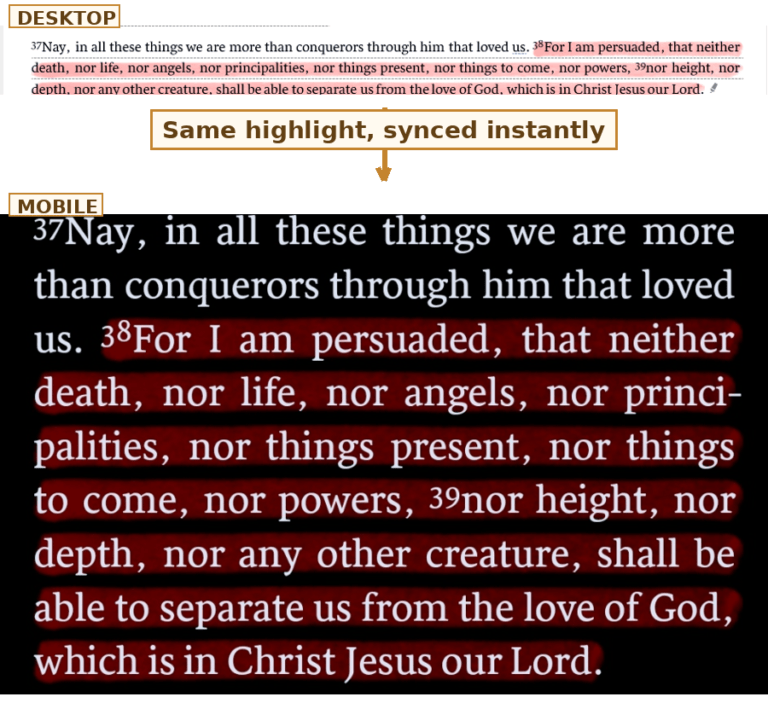
The least flashy feature, and the one that quietly matters most day to day. Highlight a verse on your phone, and it’s sitting in your desktop layout later, filed exactly where you left it.
I tested this one the honest way: highlighted a verse on desktop, then walked over and pulled up my phone to see if it actually followed me there.
The first shot is the highlight as I made it on desktop. The second is what I found on my phone. The third lines them up together so you can see it for yourself, same verse, same highlight, two devices.
Another honest nuance worth knowing, and I only found this by testing it myself. I highlighted Romans 8:38-39 on desktop, then pulled it up on my phone expecting to see the highlight right there. It wasn’t. For a second I thought sync was broken. Then I realized my phone was open to a different translation than the one I’d highlighted in. I switched to match, and the highlight appeared instantly.
Small detail, but worth knowing if you read from more than one translation. The sync works exactly as advertised, it’s just syncing to that specific translation, not universally across every version you own.
Things to Watch Out For (What Other Reviews Won’t Tell You)
This is the section most Logos reviews skip. Usually because they’re written by people hoping you’ll click their affiliate link and buy the biggest package. This review wants you to buy with your eyes open, so here’s the honest list.
What Customers are Saying…
Steep learning curve, expect 2 to 4 weeks before it feels intuitive
Costs stack quietly through subscriptions, library packages, & app purchases
Longtime users have pushed back hard on the shift to subscription pricing
Overkill for simple devotional reading, a free app does that job just fine
Can run slow on older hardware with limited RAM or no SSD
Some users report friction with cancellation and refund policies
Let’s break down what each of these actually means for you.
The Learning Curve Is Real, and It’s Steep New users consistently report feeling overwhelmed in the first two weeks, not empowered. The interface throws panels, guides, tools, and menus at you all at once, and most people spend more time hunting for features than actually studying. Most hit a wall around day three and either push through or quietly go back to their old routine. The fix: commit to learning one tool per week instead of trying to master everything at once. Budget about a month before Logos starts feeling faster than your old methods.
The Costs Stack in Ways the Pricing Page Doesn’t Show You’ve got the subscription, then the library package, then à la carte commentaries that always seem to go on sale right when you’re prepping a series on that exact book. Individually, each purchase feels reasonable. Collectively, users report crossing well past $2,000 without ever making one big decision. Track your total spend somewhere. The drip can creep.
Longtime Users Feel Burned by the Subscription Shift For decades, Logos sold software you bought once and owned outright. Moving core features behind a monthly subscription drew real frustration from users who’d already invested thousands in their libraries, and that reaction shows up across Logos’s own community forums and independent reviews. Purchased books remain yours forever, to be fair. But the newest tools now live behind the subscription paywall.
This Is Overkill for Devotional Reading If your goal is reading Scripture daily and growing spiritually, a free app does that beautifully. Buying Logos for devotions is like buying a commercial kitchen to make toast. There’s no shame in not needing it.
Performance Can Drag on Older Hardware Big libraries mean big indexes. On machines with limited RAM and no SSD, searches that should be instant can noticeably lag. Check the system requirements honestly before buying, especially if your computer is a few years old.
Cancellation and Refund Friction Gets Reported Some users describe more steps than expected to cancel, or confusion over what’s refundable. The policies themselves are workable, but read them before purchasing, not after. Screenshot the terms while you’re at it.
Perk moment: SUPPORT
Logos support is rated 4.6 out of 5 by verified users, and the reviews back it up, people specifically mention support reps who went out of their way to help. The one real complaint that surfaces is cancellation policy rigidity, not the support experience itself. Worth knowing both sides before you commit.
Logos vs. the Alternatives: Where Else Should You Look?
Before settling on Logos, it’s worth knowing what else is out there. Here’s the honest comparison.
Logos vs. Accordance This is the classic heavyweight matchup. Accordance built its reputation on speed and simplicity. It launches fast, searches fast, and doesn’t bury you in panels. It’s especially well regarded on Mac, and it has decades of credibility in academic circles.
The trade-off comes down to depth versus focus. Logos wins on raw library size and ecosystem depth, connecting your books, notes, and study tools into one system. Accordance leans into a cleaner, faster experience with a smaller but highly curated set of resources. Think of it as sports car versus research library. If simplicity and speed matter more to you than sheer scope, Accordance deserves a serious look, especially if you’re on Mac.
Comparison Table
Logos
Accordance
Olive Tree
Platform
Windows, Mac, mobile
Mac-native, Windows, mobile
iOS, Android, web
Library Size
Very large
Smaller, curated
Small, add-on packs
Original Language Tools
Extensive
Strong, fast searching
Basic
Learning Curve
Steep
Moderate
Easy
Pricing
$14.99/mo
$49+
Free
Free Trial Available
Rating
The Free and Budget Tier: Olive Tree, e-Sword, and Blue Letter Bible These tools genuinely deserve respect, not just a footnote. Olive Tree has a clean reading experience with a solid split-screen for following a commentary alongside the text. e-Sword has served budget-conscious students on Windows for decades. Blue Letter Bible is a great browser-based option for a quick Strong’s number lookup without opening anything heavier.
Here’s the part most reviews won’t tell you straight: free apps genuinely win for casual reading, devotionals, and verse memorization. If that’s most of your Bible time, a free tool isn’t the budget option. It’s the correct option. Buying Logos for a devotional-only season is a mismatch between the tool and the need, not a bargain.
Free Apps
Built for research and teaching
Devotional Reading
Memorizing Verses and Text
Quick Lookups and highlights
Overkill for casual reading
Logos BIble Software
Built for research and teaching
Sermon and lesson prep
Greek and Hebrew word studies
Connected notes and commentaries
Overkill for casual reading
But Here’s What Nothing Else Fully Replicates Full syntax searching, finding grammatical patterns in the Greek, not just individual words, is rare outside Logos. So is the integrated workflow where notes, commentaries, original-language data, and sermon prep all live in one connected system. For anyone building a teaching series or writing weekly, that integration is a real time-saver that a stack of free apps can’t fully match.
The Decision Framework Match the tool to your actual study habits, not your aspirational ones. Ask what you did with Scripture in the last 30 days, not what you hope to do someday.
If you read and reflected, go free. If you taught, prepped, or dug into original languages at least weekly, Logos starts earning its price. And the good news either way: you can always upgrade later when your habits change.
Logos is a Bible study platform that combines a personal library of commentaries and reference books with research tools like original-language search, sermon prep, and study guides, all connected so your books and tools work together instead of sitting separately.
Can I use Logos on my phone and computer?
Yes. Logos works on Windows, Mac, iOS, and Android, and your library and notes stay synced across every device you’re logged into.
Do I need to be online to use it?
Partially. You can read owned books and access private notes and highlights offline, but guides, full search, and word lookups need an internet connection.
What’s the difference between a subscription and a library package?
Your subscription (Premium, Pro, or Max) unlocks Logos’s tools and features. Your library package (Starter through Portfolio) is the actual collection of books you own. You typically need both, a subscription to use the tools, and a library to have something to study with.
Is there a free version?
Yes. Logos offers a free edition with a basic library and limited tools, no subscription required. It’s a genuinely usable starting point, though the deeper study tools require a paid tier.
How long is the free trial?
Logos’s standard free trial is 30 days. Through the link in this review, you can access an extended 60-day trial instead.
What’s the difference between Premium, Pro, and Max?
Premium ($9.99/mo) is built for small group leaders and personal study. Pro ($14.99/mo) adds pastor-focused tools like Sermon Builder and intermediate original-language help. Max ($19.99/mo) adds advanced original-language tools and access to top academic resources.
What happens to my library if I stop subscribing?
Your purchased books stay yours. You lose access to subscription-only tools and features, but the library itself doesn’t disappear.
What’s dynamic pricing?
It’s Logos’s system for automatically discounting a purchase based on resources you already own, so a bundle only charges you for what’s actually new to you.
If I buy a new library, do I pay for books I already own again?
No. Logos uses what they call dynamic pricing, it checks what you already own and only charges you for the new content in a bundle, not the parts you already have.
Can I use a payment plan for a big purchase?
Yes, for purchases over $100. Logos offers its own payment plan and a Klarna option, though payment plans aren’t available for subscriptions or pre-order titles.
Do libraries differ by denomination?
Yes. Logos builds separate library ladders for traditions like Baptist, Lutheran, Reformed, Orthodox, and others, each curated with resources specific to that tradition, at matching price points across traditions.
Will my notes and highlights sync across devices?
Yes, as long as you’re connected to the internet. One nuance worth knowing: highlights sync by the specific Bible translation you used, not universally across every version, so a highlight on one translation won’t automatically show up if you’re reading a different one on another device.
What’s Logos’s return policy?
Logos offers a 30-day money-back guarantee on non-subscription purchases, with each item returnable once per account.
What if I need help learning the software?
Logos has an extensive Help Center, in-app tutorials, and a QuickStart guide included with every package. Their community forums are also active if you get stuck.
What happens to my books if I upgrade my library later?
You keep everything you already own. Dynamic pricing also counts your current library as credit toward the cost of upgrading.
Can students or ministry workers get a discount?
Yes. Logos offers an academic discount program for students and faculty, and separate ministry-specific discounts are available as well.
Do I lose access if I cancel my subscription?
You lose subscription-exclusive tools, but not your purchased library. Additionally, after 24 consecutive months of subscribing, Logos grants a Legacy License that keeps core offline features active even after you cancel.
The Verdict: Who Should Actually Buy Logos in 2026?
Alright, we’ve covered a lot of ground. Let me land the plane and tell you exactly who I’d point toward Logos, and who I’d steer toward the door.
My rating: 4.8 out of 5 stars. The cost stacking and pricing structure trip up new buyers, and the learning curve costs real time before the payoff kicks in. Those are legitimate dings. But for its intended user, nothing else on the market matches the library depth, original-language tools, and integrated research workflow. Half a star off for the wallet and the onboarding. Full marks for what it actually does.
Now let’s get specific.
Buy it without hesitation if you’re a pastor doing weekly sermon prep. This is the slam-dunk case. Between verse lookups, commentary pulls, slide creation, and word studies, a working preacher can easily save 3 to 5 hours every week. That’s the whole ballgame right there.
Seminary students, professors, and researchers are in the same boat. If you’re writing exegesis papers or building curriculum, the original-language tools and citation-ready library aren’t luxuries. They’re basically your job requirements in digital form. Grab the academic discount and don’t look back.
Serious lay students, you’re a good fit, with caveats. If you teach a small group, lead studies, or genuinely love digging deep, Logos will reward you. But be honest about your willingness to climb the learning curve we talked about earlier. People who commit to a month of deliberate learning tend to stick with it. People who don’t tend to bounce off the interface and never open it again. Know which one you are before you buy.
And here’s who should walk away: devotional readers, casual users, and anyone on a tight budget. No shame in this category. A free app serves devotional reading beautifully. The wrong tool at the right price is still the wrong tool.
I said earlier that Logos isn’t for wading, it’s for diving. I want to end on that, because it’s the truest thing I can tell you about this software. A snorkel shows you the surface, and there’s real beauty in the surface. But some of you reading this aren’t looking for the surface. You’re leading people. You’re teaching people. You’re trying to go deep enough in the Word that you have something real to hand off to someone else. If that’s you, Logos isn’t a luxury purchase. It’s gear built for the depth you’re already trying to reach.
If you’ve decided you’re a fit, here’s the entry path I’d recommend. Start with the free tier for a week or two to learn the interface with zero pressure. Then activate the 60-day free trial and stress-test the premium features on a real project, an actual sermon, an actual paper. If it sticks, land on the Pro subscription at $14.99 a month, which hits the sweet spot for most users. Only then start making targeted library additions, buying commentaries for books you’re actively teaching, not sets that just look impressive.
That path costs you almost nothing to find out if this tool fits your life.
Here’s the ROI framing that settles it. Take your prep hours saved per week, multiply by what your time is worth, and stack that against fifteen dollars a month. For a weekly teacher, Logos pays for itself before the first Sunday of the month.
For everyone else? Enjoy the free apps, read deeply, and don’t let anyone tell you that you need expensive software to take Scripture seriously. You don’t.
But if you’re the person this was built for, I’ll say what I said at the very beginning of this review. This whole site exists because I believe the way we grow closer to God matters, and sometimes that means picking up the right tool for the depth we’re being called to. You’ll know by day 60 of that trial whether this is that tool for you.
Josiah is the founder of The Humble Perspective, part of a growing portfolio of ventures built around faith, leadership, and serving people well. He’s passionate about technology and how it can serve the body of Christ in real, meaningful ways. He’s also pursuing graduate study in Industrial-Organizational Psychology, hoping to use that knowledge to serve the Church at a deeper level. That same research-first instinct shows up in how he reviews everything on this site, hands-on testing over marketing copy, so you walk away with real answers, not more confusion.